
-
By Gunjan Gupta
- In Uncategorized
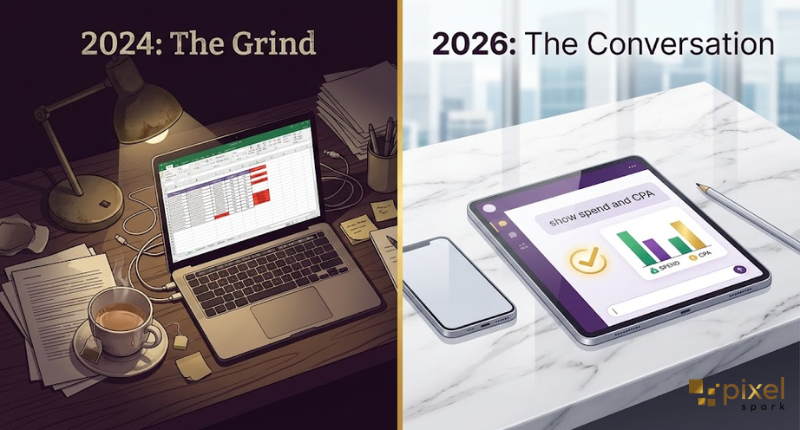
Do you still spend your Sunday nights pulling numbers from Meta Ads Manager? Copying them into a spreadsheet? Then building a report for Monday’s meeting?
If yes, there’s good news. You don’t have to do this anymore.
In April 2026, Meta launched something called “AI Connectors.” This lets you connect an AI tool, like Claude, straight to your ad account. Once it’s connected, you can just type a question like:
“Which ads are losing performance this week?”
And Claude will look at your live data and give you a real answer. No CSV files. No pivot tables. No late nights.
Some agencies using this are saving up to 90% of the time they used to spend on reporting.
Let’s break down what this means for you, in plain language.
What Are Meta Ads AI Connectors?
Before this, connecting an AI tool to your ad account was messy. You needed a third-party app. You had to wait weeks for approval. And there was always a small fear in the back of your mind: “Will Meta flag my account for using some unofficial tool?”
That worry is gone now.
On April 29, 2026, Meta launched its own official connector. It was built by Meta, for Meta. This means it’s safe and approved.
It works using two simple parts:
- A connector that lets Claude read your campaign data and answer your questions in normal chat.
- A tool for developers who want to build fully automated workflows.
Together, these give you 29 different tools. You can use them for reporting, creating new campaigns, changing budgets, managing your product catalogue, and checking your account’s health.
Setting it up is easy too. You just sign in with your normal Meta Business login. No developer codes. No waiting.
Meta isn’t the only one doing this, by the way. Google did the same thing back in October 2025. Amazon followed in November. So this is quickly becoming the new normal, not just a trend.
One thing that makes Meta’s version stand out: it can both read AND make changes to your account (with your permission first). Most other tools can only read data and tell you what’s happening.
So what does this really mean for you? It means using AI to help run your ads isn’t a risky hack anymore. It’s a proper, approved way of working; built and backed by Meta itself.
The Real Problem: Catching Tired Ads Before They Waste Your Money
Here’s something every marketer has seen happen.
You create an ad. It performs really well at first. But Meta keeps showing it to the same people again and again. Over time, people get bored of seeing it. This is called “ad fatigue.”
When this happens:
- Frequency (how many times the same person sees your ad) goes above 3.
- Click-through rate (CTR) drops by 20-30%.
- Your cost per result starts climbing.
And by the time you notice this in your weekly report, you’ve already wasted 3 days of ad spend on something that stopped working.

Here’s the tricky part: most Meta ads only stay fresh for about 3 to 5 days before they start losing steam. The problem isn’t that marketers don’t know this. It’s that nobody has the time to check every single ad, every single day.
This is exactly where Claude helps. Instead of digging through tabs in Ads Manager, you just ask:
“Which ads have a frequency above 3, and a CTR drop of more than 25% from their first week? Show me the spend and cost per result for each.”
Claude checks your live account and gives you the actual names of the ads that are struggling. No vague lines like “some ads seem to be underperforming.” Just real names, real numbers.
A Simple Example
Let’s say you’re running a campaign with a budget of ₹1 lakh a month.
Your best-performing ad starts losing steam on day 4. But nobody notices until the Friday report comes in. That’s almost a full week of wasted spend, on just one ad, in one campaign.
Now imagine this happening across every ad set in your account, every single week, without anyone catching it in time. That’s a lot of money quietly slipping away. This is the real reason daily AI monitoring is worth it.
The Bigger Win: Seeing Meta AND Google Together
Most articles about AI and Meta Ads stop here. But there’s a bigger opportunity most people miss.
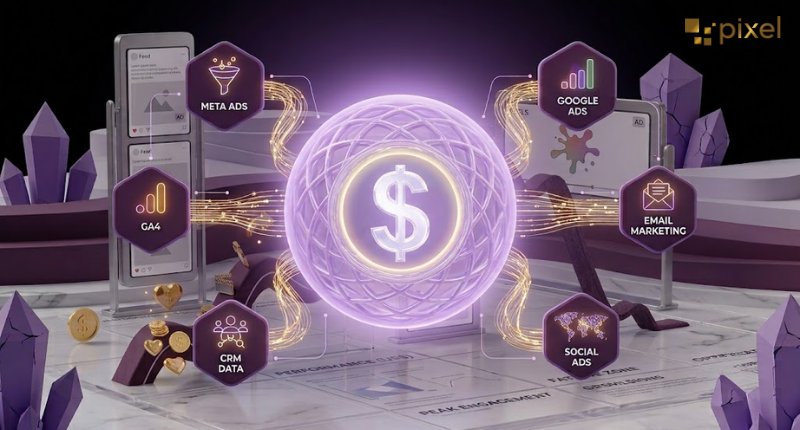
The real value isn’t just having AI manage your Meta account. It’s having AI look at Meta, Google Ads, and Google Analytics (GA4) all at once, in the same conversation.
Here’s a great example of why this matters. It’s called the “Meta-to-Google halo effect.”
Someone sees your ad on Instagram. They don’t click it right away. But three days later, they search your brand name on Google and buy something. Google Ads reporting will show this as a “Google win.” But really, it was your Meta ad that started the whole thing.
If you’re only looking at Meta’s dashboard, or only Google’s, you’ll never spot this connection. But Claude can see both at once, and connect the dots for you.
Agencies using this cross-channel approach report cutting their manual reporting work by around 90%. Even if the real number is a little lower in practice, the direction is clear: the old way of “pull data → build slides → present on Friday” is turning into a quick, same-day chat.
Faster Ad Creation, But With One Important Catch
Teams are now using Claude to create 20 to 30 different versions of an ad (mixing up the topic, the persona, and the visual style) in the time it used to take to brief just one designer.
One founder even built a full pipeline using Claude Code that created hundreds of ad variations and uploaded them straight to Meta.
Here’s the interesting part: the best-performing ads were often ones the marketer never would have thought of themselves.
This isn’t because AI is more creative than people. It’s because of volume. When you give Meta’s algorithm more options to test, it finds out what actually works, instead of you guessing with just 4-5 generic ads.
But here’s the catch, and it’s an important one for your clients too: automation is great at doing the work. It’s not great at brand judgment.
The final check of “does this sound like us?” still needs a real person. Don’t let a client’s brand voice be fully handed over to a prompt.
Do You Still Need Advantage+ If You’re Using Claude?
A question we hear a lot: “If Meta’s own Advantage+ already automates my targeting and budgets, why would I need Claude too?”
Good question. The answer is yes, you still need both, because they solve two different problems.
Think of Advantage+ as a black box. It’s great at finding a wide audience fast. But if you leave it alone for too long, it can start chasing cheap clicks instead of real results.
Claude is more like a window you can see through. You can ask it why it made a certain decision. You can ask it to explain its thinking. This helps you catch the moment Advantage+ starts optimising for the wrong thing.
The smartest teams in 2026 use both together. Let Advantage+ handle the wide reach. Let Claude keep an eye on it and flag any problems.
Is This Safe? What About Getting Banned?
This is a fair worry, and it’s one that came up a lot in early 2026. Some advertisers had their accounts restricted after using unofficial, third-party AI tools- the kind that scraped data without permission.
But that risk is much lower now, because Meta built and approved this connector themselves. It comes with safety built in. For example, any new campaign Claude creates starts in “paused” mode. You have to review and approve it before it goes live.
Most of the account bans people saw earlier in the year were from browser automation tools or scraping tools, not from Meta’s own official system.
The simple safety rule either way: always have a real person review any change before it goes live, and only use Meta’s official tools or Meta-approved partners.
What This Means for You
If you’re running Meta ads for a D2C brand, a SaaS company, or any Indian business spending anywhere from ₹2 lakh to ₹10 lakh a month, here’s what actually matters:
- Reporting is the easiest thing to hand off. If your team spends more than 2 hours a week building reports by hand, start there.
- Catching tired ads early saves real money. A 20% drop in CTR, left unnoticed for a week on a ₹1 lakh campaign, adds up fast.
- Looking at Meta and Google together is where the real value is, not just automating one platform alone.
- People still matter. The agencies doing well right now use Claude like a fast, hardworking junior analyst; not as a replacement for real strategy and brand thinking.
Want to see how this could work for your own ad account?
At Pixel Spark, we’ve already built this kind of AI-assisted workflow into how we manage our clients’ campaigns. Faster answers, same accountability, and zero bs in the reports.
Write to us at contact@pixelspark.in, and we’ll walk you through the numbers, not just a sales pitch.

Frequently Asked Questions (FAQ)
How do I connect Claude to my Meta Ads account?
+
You add Meta’s official connector inside Claude, then sign in using your normal Meta Business login. No developer account needed. It takes just a few minutes.
Can AI actually run my Facebook and Instagram ads, or just report on them?
+
Both. It can read your data and also make changes, like creating campaigns or adjusting budgets. But new campaigns always start paused, so you get to review them first.
Will using AI on my Meta ad account get it banned?
+
Not if you use Meta’s own official connector. That’s the safe, approved way. The risk only came from unofficial, scraping-based tools used earlier in 2026.
How much time can AI really save on reporting?
+
Teams using AI across Meta, Google, and GA4 together report saving up to 90% of their reporting time. Even if your results are a bit lower, most teams go from hours of work to just minutes.
What is “ad fatigue” and how do I catch it early?
+
Ad fatigue happens when people see your ad too many times and stop responding to it. Watch for frequency going above 3, along with a dropping click-through rate. Since most ads fade within 3-5 days, you need daily checks, not weekly ones.
Do I still need Advantage+ if I use Claude?
+
Yes. They do different jobs. Advantage+ handles fast, wide-reach delivery. Claude helps you understand why it’s making those choices, so you can catch mistakes early.
Will AI replace media buyers?
+
Not the important parts of the job. AI is great at pulling reports and spotting problems fast. But it can’t replace real brand judgment or strategy; that still needs a person.